Introduction
HTML CSS JavaScript for Beginners is the perfect starting point for anyone who wants to learn web development. Have you ever wondered how websites are built? Behind every beautiful, interactive page you visit, there are three core technologies working together: HTML, CSS, and JavaScript. Think of them as the foundation, the paint, and the magic of the web. In this post, we'll break down each one in plain language, show you how they fit together, and give you the confidence to start your own web development journey. Let's dive in!
Learning HTML CSS JavaScript for Beginners helps you understand how modern websites are built from the ground up. These three technologies work together to create nearly every website you visit online.
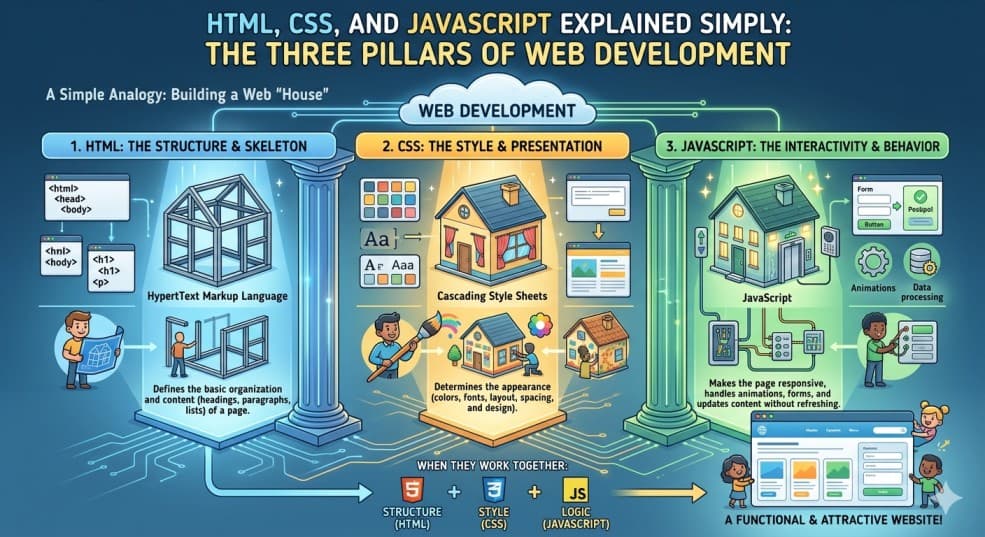
HTML: The Structure (Like the Skeleton of a House)
HTML stands for HyperText Markup Language. It's not a programming language—it's a markup language. That means it uses special tags to tell the browser what each piece of content is. For example, a heading, a paragraph, an image, or a link. Imagine building a house: HTML is the frame, the walls, and the rooms. Without it, you have nothing to decorate or animate.
How HTML Works
HTML uses tags enclosed in angle brackets, like <h1> for a main heading or <p> for a paragraph. Most tags come in pairs: an opening tag and a closing tag with a forward slash. For instance:
<h1>Welcome to My Site</h1>
This tells the browser: "This is a level-one heading." You can also add attributes to tags, like <a href=\"https://example.com\">Click here</a> to create a clickable link. HTML gives your content meaning and structure.
CSS: The Style (Like Paint, Furniture, and Decor)
CSS stands for Cascading Style Sheets. While HTML builds the structure, CSS makes it look good. It controls colors, fonts, spacing, layout, and even animations. Going back to our house analogy: CSS is the paint on the walls, the style of the furniture, and the decorative curtains. It transforms a bare frame into a beautiful home.
How CSS Works
CSS uses rules made of selectors and declarations. A selector targets an HTML element (like all <h1> tags), and declarations define how it should look. For example:
h1 { color: blue; font-size: 32px; }
This rule says: "Make every <h1> blue and 32 pixels tall." You can write CSS directly inside an HTML file, but best practice is to keep it in a separate .css file. CSS gives your site personality and appeal.
JavaScript: The Behavior (Like Electricity and Smart Features)
JavaScript is the programming language of the web. It adds interactivity, logic, and dynamic behavior to your pages. In our house analogy, JavaScript is the electricity that powers lights, the smart thermostat that adjusts temperature, and the doorbell that rings when someone presses it. Without JavaScript, a webpage is static—it just sits there. With JavaScript, it can respond to clicks, validate forms, fetch data, and much more.
How JavaScript Works
JavaScript code runs in the browser (client-side) and can manipulate HTML and CSS in real time. For example, you can write a script that changes the text of a paragraph when a button is clicked:
document.getElementById('myButton').onclick = function() { document.getElementById('message').innerHTML = 'Hello, world!'; };
This small piece of code brings your page to life. JavaScript is a full programming language with variables, loops, functions, and objects. It's what makes modern web apps like Gmail, Google Maps, and social media so responsive and interactive. JavaScript adds intelligence and engagement.
Many students searching for HTML CSS JavaScript for Beginners often wonder how these technologies interact. Understanding their relationship is essential for becoming a successful web developer.
You might be wondering: "Do I need all three?" The answer is yes, for a complete website. Here's a simple example of how they team up:
- HTML creates a button:
<button id=\"clickMe\">Click Me</button> - CSS styles the button:
#clickMe { background-color: green; color: white; } - JavaScript makes it do something: when clicked, it shows an alert.
Without HTML, there's nothing to style or script. Without CSS, the button is plain and boring. Without JavaScript, clicking does nothing. They are three pillars that support each other. A modern website is rarely built with just one of these technologies.
Learning HTML CSS JavaScript for Beginners provides a strong foundation for frontend development. These skills are required for creating websites, web applications, and interactive user experiences.
Getting Started: Your First Steps
If you are studying HTML CSS JavaScript for Beginners, start with small projects and gradually increase complexity. Consistent practice is the fastest way to improve your web development skills.
Ready to try it yourself? Here's a simple roadmap:
- Start with HTML — Learn the basic tags: headings, paragraphs, links, images, and lists. Build a simple page about your favorite hobby.
- Add CSS — Change colors, fonts, and layout. Experiment with margins and padding. Make your page look polished.
- Introduce JavaScript — Add a button that changes text or toggles a background color. Play with simple interactions.
You don't need any special software—just a text editor (like Notepad or VS Code) and a web browser. Write your code, save it with .html, .css, and .js extensions, and open the HTML file in your browser. That's it!
"The best way to learn web development is to build something—even if it's tiny. Every expert was once a beginner who never gave up."
Common Misconceptions
Many beginners think they need to master all three before building anything. That's not true! You can start with just HTML and CSS, and add JavaScript later. Another myth is that you need to memorize every tag or property. No one does that! Developers use documentation and search engines daily. The key is understanding the concepts, not memorizing syntax.
Conclusion
HTML CSS JavaScript for Beginners is one of the most important topics for anyone starting a web development journey. HTML gives structure, CSS adds style, and JavaScript brings life. HTML gives structure, CSS adds style, and JavaScript brings life. Together, they power every website and web app you use. At GreyAcademy, we have courses that guide you step-by-step from zero to building real projects. So grab your keyboard, open your browser, and start creating. The web is waiting for you!
Happy coding, and remember: every line of code you write is a step toward mastering the web.