Introduction
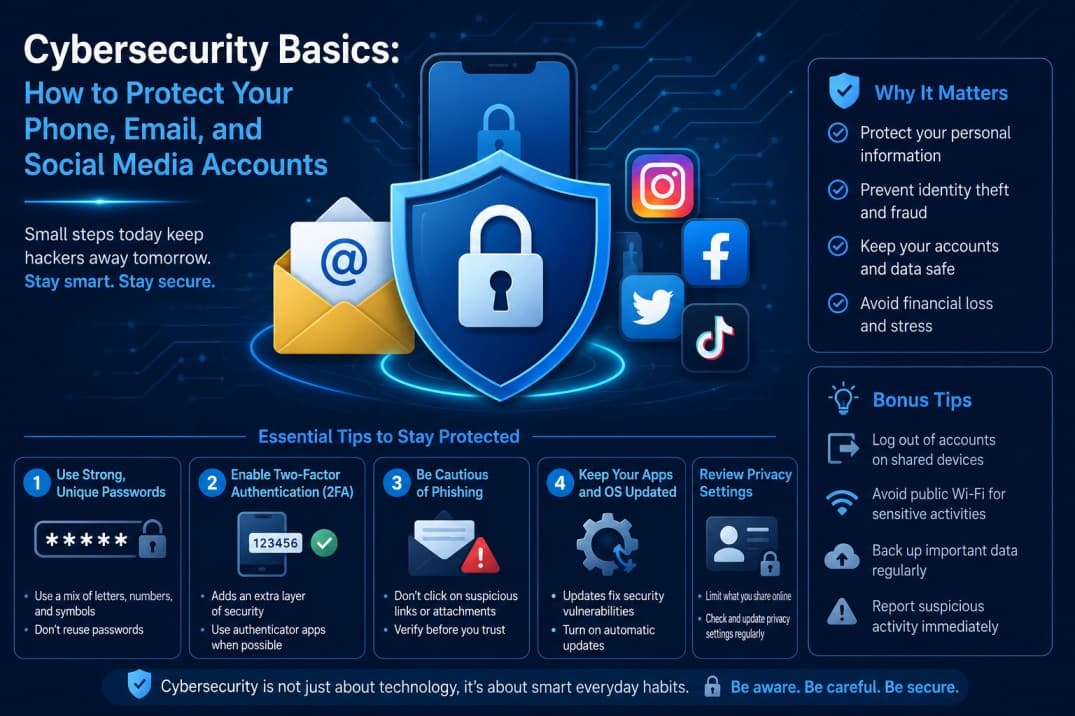
Cybersecurity Basics are essential in today's digital world, where your phone, email, and social media accounts act as the keys to your personal information. While staying connected has never been easier, it also comes with risks such as hacking, phishing scams, and data theft. If you're a student or beginner wondering how to stay safe online without becoming a tech expert, you're in the right place. In this guide, we'll cover simple and practical steps to protect your phone, email, and social media accounts from common cyber threats. By the end, you'll have a stronger understanding of online security and feel more confident every time you log in.
Learning Cybersecurity Basics early can help you avoid common online threats such as phishing scams, malware, identity theft, and account hacking. The more familiar you become with Cybersecurity Basics, the easier it is to protect your personal information and stay safe online.
You might think, I'm just a student — why would anyone target me? The truth is, cybercriminals often go after easy targets. Your accounts can be used to send spam, steal your identity, or even access your friends' and family's information. Think of cybersecurity like locking your front door: it doesn't mean someone will break in, but it makes it a whole lot harder. A few basic habits can keep your digital life safe and stress-free.
Protecting Your Phone
Your phone is probably with you 24/7, holding your photos, messages, banking apps, and social media. Here’s how to lock it down.
Use a Strong Lock Screen
Whether it's a PIN, password, pattern, or biometrics (fingerprint or face recognition), always have a lock screen enabled. Avoid simple codes like 1234 or 0000. Instead, use a 6-digit PIN or a strong alphanumeric password.
Keep Your Software Updated
Those update notifications can be annoying, but they often contain security patches for vulnerabilities. Set your phone to auto-update if possible. It’s one of the easiest ways to stay protected.
Download Apps Only from Official Stores
Stick to the Apple App Store or Google Play Store. Sideloading apps from unknown sources can expose your phone to malware. Also, check app permissions — if a flashlight app wants access to your contacts, that's a red flag.
Enable Find My Device
Both iOS and Android have built-in tracking features. Activate Find My iPhone or Find My Device so you can locate, lock, or wipe your phone if it's lost or stolen.
Securing Your Email
One of the most important Cybersecurity Basics is securing your email account because it often serves as the recovery point for your other online accounts.
Your email is the gateway to almost every other account. If someone gets into your email, they can reset your passwords and take over your digital life. Here's how to protect it.
Create a Strong, Unique Password
Avoid using the same password for multiple accounts. Use a mix of uppercase and lowercase letters, numbers, and symbols. A good trick is to use a passphrase — for example, PurpleElephant$Jump42! — which is both strong and easy to remember.
Enable Two-Factor Authentication (2FA)
2FA adds an extra layer of security. Even if someone steals your password, they can't log in without a second code sent to your phone or generated by an authenticator app. Most email providers (Gmail, Outlook, Yahoo) offer this — turn it on today.
Watch for Phishing Scams
Phishing emails try to trick you into clicking malicious links or giving away personal info. Look for signs like urgent language, spelling mistakes, or suspicious sender addresses. Never click on links or download attachments from unknown senders. When in doubt, go directly to the website instead of clicking the link.
“A phisher is like a digital con artist — they rely on you acting fast without thinking. Slow down and verify.”
Use a Password Manager
Remembering dozens of strong passwords is tough. A password manager (like LastPass, Bitwarden, or Apple's iCloud Keychain) stores them securely and can even generate random passwords for you. All you need is one master password.
Your social media profiles contain a treasure trove of personal information. Here's how to keep them safe from prying eyes.
Review Your Privacy Settings
Go into the settings of each platform (Instagram, Facebook, Twitter, TikTok, etc.) and set your profile to private. Limit who can see your posts, send you friend requests, or tag you. Regularly check which apps have access to your account and revoke any you don't use.
Be Careful What You Share
Oversharing can be risky. Avoid posting your location in real-time, your full birthdate, your phone number, or your home address. Even seemingly innocent posts — like a photo of your pet's name — can be used to guess your security questions.
Enable Login Alerts
Most social platforms let you turn on notifications for unrecognized logins. This way, you'll know immediately if someone tries to access your account from a new device or location.
Don't Use the Same Password Everywhere
We know, it's tempting. But if one account gets hacked, all your accounts become vulnerable. Use unique passwords for each social media platform, and combine that with 2FA whenever possible.
When discussing Cybersecurity Basics, social media security is often overlooked even though these accounts contain a significant amount of personal information.
General Tips for Staying Safe Online
- Beware of public Wi-Fi: Avoid logging into sensitive accounts on public networks. If you must, use a VPN (Virtual Private Network) to encrypt your connection.
- Log out of shared devices: Always log out of your accounts when using a school computer or a friend's phone.
- Back up your data: Regularly back up your phone and computer to the cloud or an external drive. In case of ransomware or device loss, you won't lose everything.
- Think before you click: If a message seems too good to be true (like winning a prize you didn't enter), it's probably a scam.
Conclusion
Cybersecurity doesn't require a degree in computer science. By taking a few simple steps — using strong passwords, enabling two-factor authentication, being cautious with what you click, and adjusting your privacy settings — you can dramatically reduce your risk. Start with one account today, then move to the next. Your future self will thank you. Remember, staying safe online is a habit, not a one-time task. So go ahead, lock down your digital life, and enjoy the internet with peace of mind. Happy (and safe) surfing!